
Nowadays, lighting is not just about brightness. It has become an effective way to change the whole mood and look of a place. Among many lighting options, many people now prefer DMX lights due to their precise control and dynamic lighting effects. However, if you are a beginner, you might feel nervous when you hear about DMX programming. So you might wonder: How to Program DMX Lights for Beginners?
No doubt, at first, wires, channels, controllers, and settings sound too technical. But in reality, DMX light programming is not as difficult as it looks. Don’t know how? Worry not! In this guide, I will discuss the step-by-step process of programming DMX lights in the simplest way possible. So let’s dive in.
Overview of DMX Lighting System & Its Working
First of all, DMX stands for Digital Multiplex. It is a digital control lighting system that manages and controls lights from a single controller. This system allows you to control multiple DMX lights at the same time without any confusion. Each light responds to specific commands, like color changes, dimming, and movement.
In simple terms, DMX is all about controlling lights using numbers. But a question arises: how do these DMX lights work? Actually, DMX sends digital signals from a controller to different lights using special cables. But before this, each light is assigned a unique address. This address tells the controller which light to control.
Now, when you press a button, the controller sends a signal. This signal tells the light what to do, such as changing color, adjusting brightness, or starting an effect. However, these signals travel very quickly, so all the lights respond almost instantly and in sync with each other. So there is no need to control each light separately. The DMX system does all this simultaneously with a single controller.
How to Program DMX Lights for Beginners?
Now you have a basic know-how of what DMX lights are and how they work. It’s now quite easy to program a DMX light. But a proper guide is very crucial. As a beginner, it will feel like a technical task. But the best part is that you do not need any technical skills to get started. To help you do this, I will guide you through programming DMX lights step by step.
Step 1: Connect & Set Up Your DMX Lights First
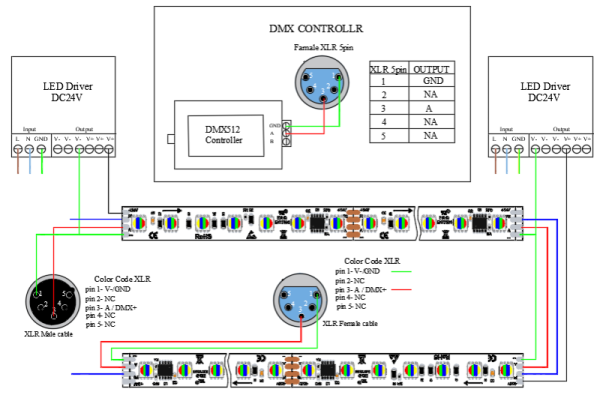
The very first step before doing anything is to set up your DMX lights. You have to place your lighting fixtures where you need them and make sure they are ready for connection. Before this, ensure that all the lights are in good condition and working properly, and then place them. After placing the lights, connect them using DMX cables.
Usually, you connect one DMX floodlight to the next in a chain. So start connecting cables from the DMX controller and go through each fixture one by one. Once done, turn on the power and check if each light is receiving a signal. If so, you have set the DMX lights correctly.
Step 2: Understand DMX Channels & Set DMX Address
In DMX lighting, each light works through channels. So, before programming, the DMX understands what it is. A channel is basically a control system for only one function of the light. For example, one channel is responsible for controlling brightness. At the same time, another channel will control colors and so on. Like this, different lights use different numbers of channels. But the main thing is that the more advanced the light is, the more channels it will have. Now, the next important thing you must understand is the DMX address. Actually, every DMX light has a unique starting point, which is known as its DMX address.
This address tells the controller exactly which light receives a certain command. It is also possible that two lights have the same DMX address. In that case, both of them will react together in the same way. This is what can actually confuse you as a beginner. But don’t worry, it’s normal. To avoid this confusion, check the user manual of your DMX fixture first. The manual will tell you how many channels the DMX light uses.
After checking the number of channels, assign that starting address to each light so the channels do not overlap. Let me explain it with an example. Suppose your first light uses 6 channels and begins at address 1. This means those channels will cover numbers 1 to 6. Now for the second light, assign it address 7 and avoid repeating the same numbers.
Step 3: Do Basic DMX Programming & Create Your First Light Scene
Now, it’s time for basic DMX programming. At this stage, you tell your lights how you want them to behave using simple controls from the DMX controller. You do this by using faders (sliders) and buttons on the controller. Each fader controls a specific function, such as brightness, color, or movement. When you move a fader, the controller sends a signal to the light, and the change happens instantly. All this is about basic programming; now, start creating your first lighting look.
First, select the lights you want to use. After that, adjust their settings slowly until you get a nice visual effect. For example, you set one group of lights to shine soft blue and keep another light group slightly dimmed. This combination of settings becomes your first scene. Once you are happy with the look, save it to the controller memory as a scene or preset. Next, when you want to create the specific light combination, you just have to recall that saved scene.
Step 4: Create Multiple Scenes & Sync Lights with Music
DMX lights are generally used for large events and stage shows. Right, that’s why a single scene isn’t enough to achieve that strong lighting effect. That’s why, after successfully setting the first scene, you can create multiple scenes quickly and easily. The entire process is the same as above. You only prepare different “lighting moods” in advance by creating these scenes. Instead of changing each light again and again during a show, you just switch between saved scenes.

For example, during a calm part of the music, you can use soft lights. However, when the music becomes fast, you can switch to bright or flashing lights. But those scenes will work with the music, right? The next step is to sync those DMX lights with the music. This means making lights react to sound. To sync the music, many DMX light manufacturers use a built-in “sound-active” mode. In these lights, there is a small microphone inside the light that listens to the music. As a result, the light automatically flashes or changes colors as the beat gets stronger or softer.
Step 5: Test Your DMX Setup & Final Adjustments
After setting up and programming your DMX lights, the final thing is to test everything. At this point, you finally make sure the DMX lighting program is set correctly. It is especially important if you are arranging a big event. For testing, first try changing colors, adjusting brightness, and switching scenes one by one.
See if all lights behave as expected. If something does not work, it usually means there is an issue with the address. So go and set it up again. During testing, also watch how smoothly the transitions between scenes and effects are. Make sure that music beats and lights are synchronized.
Some Tips for Smooth DMX Programming for Beginners
Even though the above steps are enough for a beginner to program a DMX light, they can still make some mistakes. This can lead to frustration and wasted time. To avoid this, I will discuss some additional tips to help you program DMX lights more professionally.
- Build Scenes Step by Step: Firstly, when you create DMX lighting scenes, always build them slowly. Why? Because trying to design everything at once can cause misalignment. So always start with one simple look and gradually add more elements like movement or effects.
- Save Work After Every Change: DMX controllers let you save scenes. If something goes wrong or power is lost, you can lose your work if it is not saved. That’s why you should make it a habit to save your settings regularly. For example, you should create the first, second, and third scenes and immediately save them.
- Avoid Overloading Effects: One common mistake beginners make is using too many effects at the same time. This will ultimately result in a messy, uncomfortable lighting setup. That’s why you should try to use one or two effects at a time so the lighting remains smooth.
- Label Everything: When working with multiple lights and cables, labeling is very helpful. How? When you mark your lights, cables, and even scenes, you always know what each one does. Next time, you won’t have to be confused about anything. This will save time and reduce efforts.
Conclusion
DMX lights are among the most effective ways to create a variety of lighting effects with a single controller. These lights change color and brightness with movement and music beats. But when it comes to programming DMX lights, many get confused and feel it is tricky. In reality, if you know the basics and a few tips, it becomes very easy to program a DMX light.
But remember, each of those steps is equally important. But I recommend that you don’t rush the process. First, start with the basic scene, then move on to multiple scenes. Also, be very careful in assigning the address and setting channels. With regular practice, you can gain more confidence in creating a DMX lighting program.